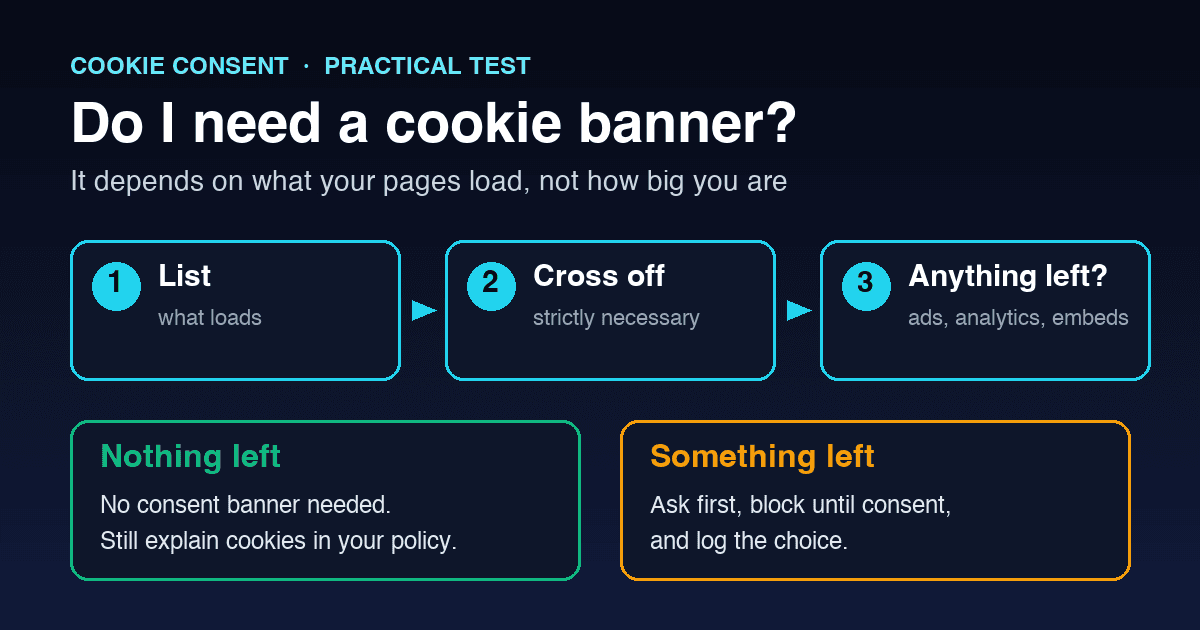
"Do I need a cookie banner?" is one of the first questions people ask when they launch a website, and the honest answer is: it depends on what your pages load, not on how big your business is. A one-page site with a Meta Pixel needs consent. A large web app that only uses a login cookie may not.
This guide gives you a test you can run in about five minutes, explains how the answer changes for visitors in the EU, the UK, India and the US, and lists the tools that quietly turn a no into a yes. It is practical guidance, not legal advice.
Quick answer
You need a consent banner if your site stores or reads anything on a visitor's device that is not strictly necessary for the service they asked for, and you have visitors from places whose rules require consent for that, mainly the EU and the UK. Analytics, advertising pixels, social media embeds, session recording and most chat widgets usually fall into that group.
If everything your site sets is strictly necessary, you do not need a consent banner. You still need to tell people what those cookies do, normally in a cookie or privacy policy.
The rule in two paragraphs
In the EU, Article 5(3) of the ePrivacy Directive says storing or reading information on a user's device needs consent, unless it is only for carrying a communication or strictly necessary for a service the user explicitly asked for. The rule covers cookies, local storage, pixels and similar technologies, not just files called cookies.
The UK applies the same idea through PECR. Since the Data (Use and Access) Act 2025, the ICO lists five exceptions: communication, strictly necessary, statistical purposes, appearance and emergency assistance. The statistical purposes and appearance exceptions only apply if you give clear information and a simple, free way to object. If you do not, you need consent instead.
The five-minute test
Step 1: List what your site actually loads
Do not work from memory or from what your developer set up two years ago. Open your homepage in a private browser window, open the developer tools, and look at the cookies and local storage in the Application tab, then at the third-party domains in the Network tab. Repeat on a product page, a blog post and your contact page, because many tools only load on specific pages.
A scanner does this faster and catches things that only appear after a few seconds. Our article on what cookie scanners find and miss explains how to read the results.
Step 2: Cross off what is strictly necessary
Remove anything the visitor's request cannot work without: a shopping basket, a login session, security and fraud checks, load balancing, and the cookie that remembers a visitor's consent choice. Judge it from the visitor's side, not yours. Your business may depend on advertising, but advertising is not part of the service the visitor asked for. Our guide on what counts as strictly necessary goes through the borderline cases.
Step 3: Look at what is left
If the list is now empty, you do not need a consent banner. If anything remains, ask where your visitors are and what the item does:
- Analytics needs consent for EU visitors. For UK visitors it may fit the statistical purposes exception if it is used only to improve your own site, the data is not used for advertising, and you offer an easy way to object.
- Advertising and retargeting pixels need consent in the EU and UK. There is no exception for advertising.
- Embeds and widgets such as video players, maps, social feeds and chat tools usually set their own cookies or storage and need consent unless they are configured not to.
- Preference cookies such as a language or dark-mode choice may fall under the UK appearance exception, with the same information and objection conditions. In the EU, regulators accept some user-chosen preferences as necessary when they only remember a choice the visitor actively made and do not last longer than needed.
Step 4: Check that the banner actually controls something
A banner that shows Reject all while the tags keep firing is worse than no banner, because it misleads visitors. If you do need consent, the non-essential tools have to wait until the visitor agrees, and stay off when they refuse.
The tools that quietly change the answer
These are the items we most often see on sites whose owners believe they "do not use cookies":
- YouTube and Vimeo embeds. A standard YouTube embed sets cookies and storage as soon as the page loads. The privacy-enhanced youtube-nocookie domain reduces this but does not remove all storage.
- Google Maps embeds. An embedded map loads Google resources and can set cookies.
- Chat and support widgets. Most store a visitor identifier so the conversation continues across pages, and many add analytics.
- Meta Pixel, LinkedIn Insight Tag and TikTok Pixel. Often added by a marketing agency or a plugin and then forgotten.
- Session recording and heatmaps. Tools that record clicks and scrolling are not strictly necessary.
- Theme and plugin extras. WordPress themes and Shopify apps sometimes add analytics or third-party services you never chose. See our guides for WordPress and Shopify.
One embed is enough to change the answer from no to yes, which is why the scan in step 1 matters more than anything you remember installing.
What changes by region
EU visitors
The strictest case. Consent must be given before non-essential cookies are set, it must be as easy to refuse as to accept, and you should be able to show that consent was given. Our GDPR cookie consent requirements guide covers the detail.
UK visitors
Mostly the same as the EU, with the extra exceptions for statistics and appearance described above. Those exceptions are not a blank cheque: they need clear information and an easy, free way to object, and they do not cover advertising.
Visitors in India
The Digital Personal Data Protection Act 2023 does not have a separate cookie rule, but where cookies or trackers process personal data, its consent, notice and withdrawal requirements apply. Our DPDPA cookie consent guide explains how that maps to banners and consent records.
US visitors
There is no federal law that requires a cookie consent banner. Several state privacy laws, including California's, give people the right to opt out of the sale or sharing of their personal information, which often covers advertising pixels, and California expects businesses to honour the Global Privacy Control signal as an opt-out. Our GPC testing checklist shows how to check that.
If you really do not need a banner
Good news, but do three things anyway:
- Write a short cookie section in your privacy policy that lists the strictly necessary cookies, what each does and how long it lasts. Exempt from consent is not exempt from transparency.
- Re-check after every change. A new plugin, a marketing campaign or an embedded video can change the answer overnight. A scan after each release takes minutes.
- Keep a note of your reasoning. If a customer, client or auditor asks why there is no banner, a dated list of what the site loads and why each item is exempt is the best answer.
If you do need a banner
Keep it honest and simple: clear categories, Accept and Reject with equal weight, a link to your policy, and tools that actually wait for the visitor's choice. Then keep a record of what each visitor chose and which version of your policy they saw. Our cookie banner examples show what that looks like in practice.
COKIQ starts with a free scan that lists the cookies, scripts and third-party tools your site loads. If you need consent, it can hold analytics, marketing, chat, video and map embeds until the visitor agrees, pass the choice to Google Consent Mode v2, and log each choice with the policy version. You can run a free scan to see what your own site loads before deciding anything.