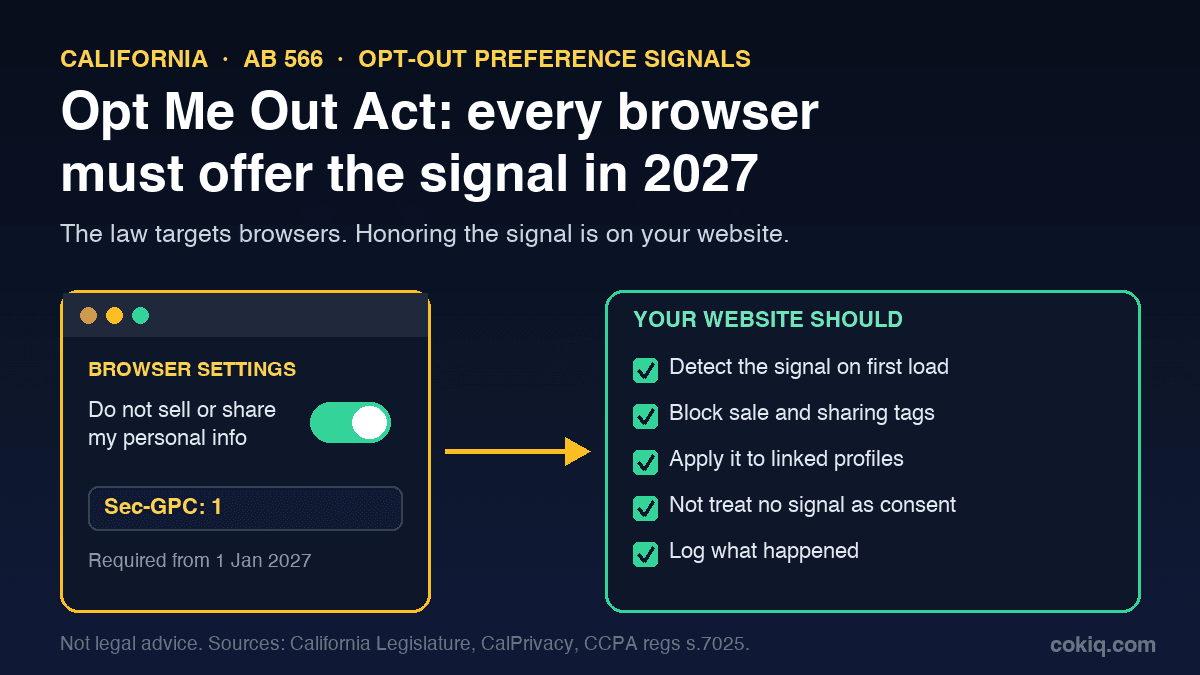
In October 2025 California passed a short law with a memorable name: the California Opt Me Out Act (AB 566). It does one thing. From 1 January 2027, every web browser used in California must include a setting that lets people send an opt-out preference signal to every website they visit.
The law is aimed at browser companies. Website owners still need to pay attention, because the obligation to act on that signal already sits with you if you sell or share personal information. Today only some visitors have the signal switched on. Once every browser offers it, many more will. If your tags ignore it, the gap gets wider every month.
This guide explains what AB 566 says, what the CCPA regulations already require, and what to check on your website before January. It is an operational guide, not legal advice. Sources are listed at the end.
The short version
- The Act regulates browsers. A business may not develop or maintain a browser that lacks a consumer-configurable way to send an opt-out preference signal. The setting must be "easy for a reasonable person to locate and configure."
- Websites already have to listen. Under the CCPA regulations, a business that sells or shares personal information must treat a valid signal as a request to opt out of sale and sharing.
- The signal people will meet most is Global Privacy Control (GPC). CalPrivacy, the state privacy agency, points consumers to GPC browsers and extensions today.
- What changes in 2027 is scale. Expect a lot more signals, and regulators that already run sweeps on exactly this.
What the Opt Me Out Act actually says
AB 566 adds section 1798.136 to the California Civil Code. Stripped down, it has five parts:
- Browsers must offer the setting. A business shall not develop or maintain a browser that does not include functionality, configurable by the consumer, that sends an opt-out preference signal to the businesses the consumer interacts with through that browser.
- It must be easy to find. The setting has to be easy for a reasonable person to locate and configure.
- Browsers must explain it. The browser maker has to say in its public disclosures how the signal works and what it is meant to do.
- Browsers are not liable for websites. A browser maker that ships the setting is not liable when a website that receives the signal breaks the law.
- Definitions and timing. A "browser" is an interactive software application used to locate, access and navigate websites. An "opt-out preference signal" is a signal that communicates the consumer's choice to opt out of the sale and sharing of their personal information. The section applies from 1 January 2027, and the California Privacy Protection Agency may adopt regulations to implement it.
Point 4 matters for you. The law deliberately places responsibility for honoring the signal on the receiving business, not on the browser.
CalPrivacy's own explainer, published in January 2026, describes the goal plainly: instead of opting out on hundreds of sites one by one, a person turns on one browser setting and every site they visit is told not to sell or share their information. It also confirms the deadline applies to browsers on desktop and mobile.
What websites already have to do: the CCPA rule on signals
The duty to honor these signals is not new. Section 7025 of the CCPA regulations already sets it out. The key points for a website:
- Treat the signal as a valid opt-out. A business that sells or shares personal information must process a qualifying signal as a request to opt out of sale and sharing. The regulation gives the HTTP header field or the JavaScript object as examples of a commonly used format, which is exactly how GPC works.
- Apply it to the browser and any linked profile. The opt-out covers that browser or device and any consumer profile associated with it, including pseudonymous profiles. If you know who the person is, it applies to them as well.
- Do not ask for more. You cannot require extra information beyond what is needed to send the signal. You may offer an optional way to provide more details, for example to extend the opt-out to offline data, but if the person ignores it you still process the signal.
- The signal wins over an old setting. If the signal conflicts with a site-specific privacy setting that allowed sale or sharing, you process the opt-out. You may then tell the person about the conflict and ask for consent under the regulations' consent rules.
- No signal later is not consent. If a known consumer previously sent a signal, its absence on a later visit cannot be read as opting back in.
- You may show that it worked. You can display something like "Opt-Out Preference Signal Honored", or a toggle showing the visitor is opted out. That is optional.
If your business does not sell or share personal information, section 7025 says this processing is not required. Most sites that run advertising pixels, retargeting or cross-context ad tags should not assume they are in that group without checking what those tags do.
Why 2027 raises the stakes
Regulators are already looking. On 9 September 2025 the California Privacy Protection Agency and the Attorneys General of California, Colorado and Connecticut announced a joint investigative sweep of businesses that may not be processing opt-out requests sent through GPC.
Until now, a site that ignored GPC affected only the visitors who had found an extension or picked a browser that supports it. When every browser has the setting, the share of visitors sending the signal is likely to grow, and each one is a request your site either honors or does not. The legal duty does not change on 1 January. What changes is how many people are relying on it.
A website checklist before January 2027
1. Know which tags count as sale or sharing
You cannot switch off what you have not listed. Scan your main templates (home, product, checkout, blog, landing pages) and mark every script, pixel and iframe by purpose. Advertising pixels, retargeting, ad network tags and data-sharing integrations are the usual candidates. Our guide to what cookie scanners find and miss explains how to fill the gaps a single scan leaves, and the marketing pixel consent checklist helps you classify new tags before they go live.
2. Detect the signal on the first page view
Check for the Sec-GPC: 1 request header on the server and navigator.globalPrivacyControl in the browser. The check must run before sale or sharing tags fire, not after a visitor clicks something. If your tag manager loads ad tags on page load, the GPC check has to sit in front of them.
3. Make the signal change what loads
Detection alone does nothing. With the signal present, the tags you marked in step 1 should stay blocked or switch to a non-sharing mode, on every page and every visit. Test it the way a regulator would: turn GPC on, clear cookies, load key pages and watch the network requests. Our GPC website testing checklist walks through that test step by step.
4. Carry the opt-out into accounts
If a signed-in visitor sends the signal, section 7025 says the opt-out applies to the consumer profile associated with that browser, and to the consumer if known. Make sure your account system records it, and that a later visit without the signal does not quietly reverse it.
5. Handle conflicts properly
If someone previously agreed to sale or sharing in your preference center and now arrives with the signal, process the opt-out first. If you want to ask them to confirm the earlier choice, do it as a clear, separate consent request, never as a pre-ticked box or a banner that hides the option.
6. Keep evidence
When a regulator or a client asks whether you honor GPC, you want records, not memories. Log that the signal was received, what your site did with it, and which banner or policy version was in place. Our explainer on consent logging covers what a useful record contains.
7. Update the privacy policy
Say in plain language that you treat opt-out preference signals such as GPC as a request to opt out of sale and sharing, and explain how the visitor can confirm it was applied. If you need a refresher on the rest of the document, see what privacy policy a website needs.
Where COKIQ fits
COKIQ scans websites for cookies, scripts and pixels, blocks non-essential scripts until the right consent state exists, and records consent choices. It can also capture Global Privacy Control and US sale/share opt-out evidence where applicable, so you have a record when someone asks. You still need to decide which of your tags count as sale or sharing. That is a business and legal call, and no tool can make it for you. To see what your site loads today, run a free scan or review the platform features.
Not only California
Browser-level privacy signals are also part of the European debate. The European Commission's Digital Omnibus proposal included browser preference signals, and our note on the Council's October 2026 position explains where that stands. If your site already detects and honors GPC properly, you are in a better position whatever the final EU text says.
Sources
- California Legislature, AB 566 California Opt Me Out Act, bill text as chaptered (approved by the Governor 8 October 2025; Civil Code section 1798.136, operative 1 January 2027)
- California Privacy Protection Agency (CalPrivacy), California's Opt Me Out Act: Your Privacy Just Got Easier (15 January 2026)
- California Code of Regulations, title 11, section 7025, Opt-Out Preference Signals (via Cornell Legal Information Institute)
- California Privacy Protection Agency, Joint investigative privacy sweep on GPC (9 September 2025)
- W3C, Global Privacy Control specification and globalprivacycontrol.org