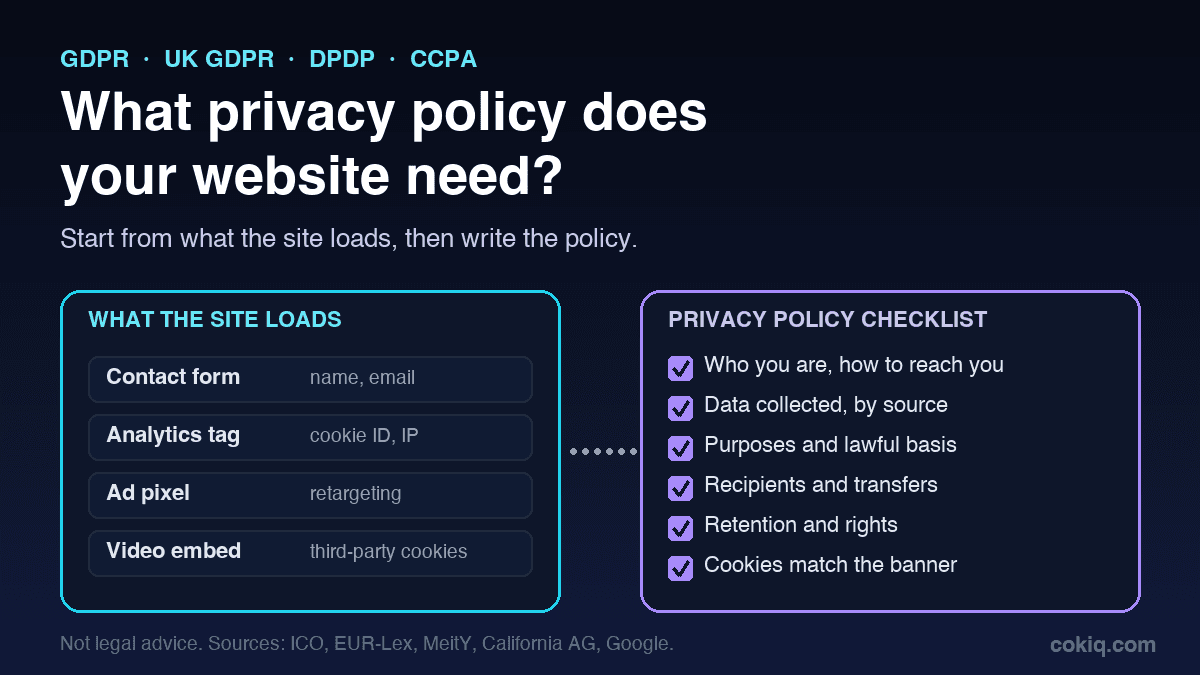
A visitor fills in your contact form. Google Analytics records the visit. A Meta pixel fires on the thank-you page. An embedded YouTube video loads its own cookies. That is four separate flows of personal data on a very ordinary website, and every one of them is something your privacy policy is expected to explain.
So the short answer to "what privacy policy is required for a website" is this: if your site collects personal data in any form, you need a privacy policy, and it has to describe what your site really does. The exact content depends on where your visitors are and which laws apply to you. The checklist below covers the common ground and the points where the main laws differ.
This is an operational guide, not legal advice. Sources are listed at the end.
Who needs a privacy policy?
Almost every site that does more than show static text. Personal data includes names, email addresses, phone numbers, IP addresses, cookie identifiers and device IDs. If your site has a form, a login, a checkout, analytics, ad tags, chat widgets or embedded media, it is collecting some of it.
Four sources set most of the expectations:
- GDPR and UK GDPR. Articles 13 and 14 list what you must tell people when you collect their data. The UK regulator, the ICO, turns this into a practical table of required privacy information, and marks which items are always required.
- India's DPDP Act, 2023. Section 5 requires a notice before or with every consent request. The DPDP Rules, 2025 add detail on what that notice must contain.
- California. The CCPA applies to for-profit businesses that do business in California and meet a threshold, such as more than $25 million in annual gross revenue or buying, selling or sharing the personal information of 100,000 or more California residents or households, according to the California Attorney General.
- Your vendors' terms. Google Analytics is the clearest example. Its terms of service say you must post a privacy policy, give notice of your use of cookies or similar technology, and disclose that you use Google Analytics and how it collects and processes data.
That last point surprises people. Even if you believe no privacy law reaches your business, the tools you install can still require a policy as a condition of use.
The core checklist: what your policy should cover
These items show up across GDPR, UK GDPR, DPDP and CCPA in one form or another. If your policy covers all of them clearly, you have a solid base.
1. Who you are and how to reach you
Your legal entity name, address and a working contact route for privacy questions. If you have appointed a data protection officer or an EU or UK representative, give their contact details too. The ICO lists organisation name and contact details as always required.
2. What personal data you collect
List it by source, not in one vague line. For example:
- data people give you: name, email, phone, company, messages, payment details;
- data collected automatically: IP address, device and browser details, pages viewed, cookie and pixel identifiers;
- data from other parties: ad platforms, payment processors, CRMs.
DPDP Rules, 2025 Rule 3 asks for an itemised description of the personal data in the consent notice, so a vague "we may collect information" will not work in India either.
3. Why you use it, and on what basis
Each purpose should be specific: answering enquiries, processing orders, sending newsletters, measuring traffic, running retargeting ads. Under GDPR and UK GDPR you also state the lawful basis for each purpose, such as contract, consent or legitimate interests, and explain the legitimate interest where you rely on it.
4. Who you share it with
Name the categories of recipients and, where it helps, the main services: hosting, email delivery, analytics, advertising, payments, support chat. If data leaves the country, say so and explain the safeguard, which GDPR and UK GDPR require.
5. How long you keep it
The ICO marks retention as always required. If you cannot give a fixed period, explain the criteria you use, for example "until you unsubscribe" or "seven years for tax records".
6. People's rights and how to use them
Spell out the rights that apply and the exact way to use them: an email address, a form or an account setting. Under GDPR that includes access, correction, erasure, restriction, objection and portability, plus the right to withdraw consent and to complain to a regulator. Under DPDP the notice must explain how to exercise rights and how to complain to the Data Protection Board. Under the CCPA it includes the rights to know, delete, correct and opt out of sale or sharing.
7. Cookies and tracking
Explain which categories of cookies and similar technologies your site uses, what they do and how people can change their choice. Link to a full cookie list or cookie policy. If you use a consent banner, the categories in the banner and the categories in your policy should match exactly. Our guide to strictly necessary cookies helps you decide what belongs in which group.
8. Changes and the effective date
Show a "last updated" date and say how you will tell people about material changes. CCPA-covered businesses must update their policy at least once every 12 months.
Where the laws differ
The core list gets you most of the way. These are the extra points that catch teams out.
- Lawful basis per purpose. GDPR and UK GDPR require it. DPDP does not frame it this way: processing rests on consent or one of the listed legitimate uses. The CCPA does not require it.
- Notice tied to the consent request. Under DPDP the notice must accompany or come before the consent request itself. GDPR asks for the information at the time of collection, and the CCPA asks for a notice at collection.
- Language. GDPR and the CCPA expect clear, plain and accessible wording. DPDP adds an option to read the notice in English or in a language listed in the Eighth Schedule to the Constitution.
- Opt-out of sale or sharing. Specific to the CCPA, which expects a "Do Not Sell or Share" route and honours Global Privacy Control signals.
- Review cycle. Everyone should update when processing changes. CCPA-covered businesses must also update at least every 12 months.
Two practical consequences:
- India. Under the DPDP Rules, 2025, the notice rule comes into force eighteen months after the Rules were published in November 2025. Use the time to write notices that stand on their own, itemise the data and purposes, and include a withdrawal link that is as easy to use as giving consent. Our DPDPA cookie consent guide goes deeper.
- California. If you sell or share personal information, the policy must explain that and link to your opt-out route. The Attorney General's guidance notes that people can also opt out through a Global Privacy Control signal. Our GPC testing checklist shows how to check that your site honours it.
The real problem: policies that drift from the website
Most privacy policies are not missing whole sections. They are simply out of date. Someone adds a heatmap tool, a new ad pixel or a chat widget, and nobody updates the policy. A year later the policy describes a website that no longer exists.
A simple way to stop that:
- Start from an inventory, not a template. Scan the live site and list every cookie, script, pixel and embed, with its owner and purpose.
- Map each item to a policy section. Analytics goes under purposes, sharing and cookies. A payment processor goes under sharing. A newsletter tool goes under purposes and retention.
- Check your banner matches. Every optional tool in the policy should sit in a banner category and stay blocked until the visitor agrees, where consent is required. See what a cookie scan finds and misses for the gaps to watch.
- Re-scan after every release. Treat a new tag like a code change. If the scan shows something new, update the inventory, the banner and the policy together.
- Keep the old versions. Record which policy version was live on which date, so you can show what a visitor was told when they gave consent.
Where COKIQ fits
COKIQ does not write your privacy policy, and it is not a substitute for legal review. What it does is keep the policy honest. As shown on the features page, COKIQ:
- scans your website for cookies, scripts, pixels and widgets, and checks for privacy, cookie, terms and DPA links;
- syncs scan findings into a cookie policy inventory while keeping your manually reviewed records;
- shows a category-based consent banner with policy links and holds non-essential scripts until the right consent state exists;
- records consent choices with timestamp, region, regulation profile, categories and policy version, as described in the consent logs docs.
If you are not sure what your site loads today, run a free COKIQ scan and use the results as the starting inventory for your policy. For the cookie side of the job, read do I need a cookie banner next.
Quick pre-publish checklist
- Legal name, address and privacy contact are correct
- Every data type you collect is listed by source
- Each purpose is specific, with a lawful basis where GDPR or UK GDPR applies
- Recipients and international transfers are described
- Retention periods or criteria are stated
- Rights, how to use them and how to complain are explained
- Cookie categories match your consent banner
- Google Analytics and other vendor disclosures are included where their terms require them
- A "last updated" date is shown, with a review date in your calendar
- The policy is linked from the footer, every form and the consent banner
Sources
- Information Commissioner's Office, What privacy information should we provide? (UK GDPR Articles 13 and 14).
- European Union, General Data Protection Regulation (EU) 2016/679, Articles 12 to 14.
- Ministry of Electronics and Information Technology, Digital Personal Data Protection Act, 2023, Section 5, and the Digital Personal Data Protection Rules, 2025, Rules 1 and 3.
- California Attorney General, California Consumer Privacy Act (CCPA), and California Privacy Protection Agency, Regulations.
- Google, Google Analytics Terms of Service, Section 7 (Privacy).