
Live on Chrome Web Store
COKIQ Cookie & Consent Mode Checker for Chrome
A free Chrome extension that shows, for the page you are on, which consent banner is in use, the default and current Google Consent Mode v2 signals, Google tag IDs, third-party trackers and cookies readable by scripts.
Chrome Web Store and the Chrome Web Store badge are trademarks of Google LLC.
Install in 3 steps
- Open the COKIQ Cookie & Consent Mode Checker page in the Chrome Web Store and click Add to Chrome.
- Pin the extension from the puzzle icon in the Chrome toolbar.
- Open any website and click the COKIQ icon to see its consent checks.
Check that it works
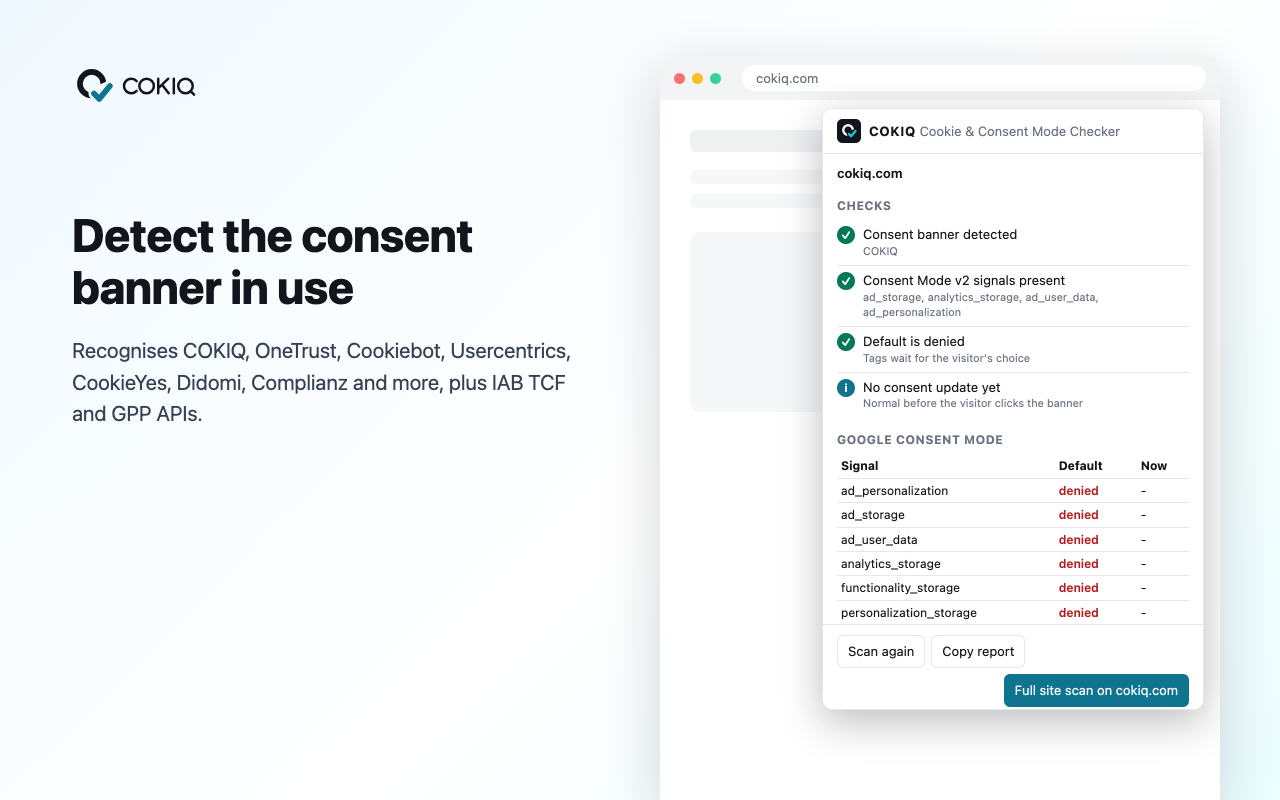
- The popup names the consent banner it found, or says none was found.
- The Google Consent Mode table lists ad_storage, analytics_storage, ad_user_data and ad_personalization with default and current values.
- Copy report gives a plain-text summary you can share with your team or client.
Questions
Is the extension free?
Yes. It is free in the Chrome Web Store and works without a COKIQ account.
Does it only work with COKIQ banners?
No. It detects many consent platforms and reads Google Consent Mode signals no matter which banner a site uses.
Does it work in Edge or Brave?
Chromium browsers that install extensions from the Chrome Web Store, such as Microsoft Edge and Brave, can usually install it. It is built and tested for Google Chrome.